Notifications -- Mutation Events
Mutation events trigger notifications on data changes.
Characteristics
- Triggered by row creation, update, deletion
- Triggered by relation creation and removal
- Can propagate through relation paths
- Evaluated after write completion
Use
Used for external system synchronization where full data change tracking is required.
Configuration
Mutation events are configured from the Notifications interface.
Navigate to:
Data Exchange → Notifications → Mutation Events
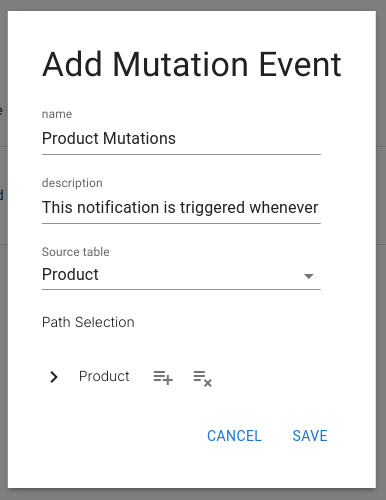
Basic Fields
Each mutation event starts with the following fields:
-
Name
A descriptive name for the event.
Example:Product Mutations -
Description
A short explanation of what the event represents.
Example:
This notification is triggered whenever a product is added, updated, or deleted. -
Source Table
The table whose rows define the root context of the mutation graph.
Example:Products
These three fields define what you are monitoring.
Path Selection
The Path Selection field defines which mutations are monitored on the source table and across its relations.
It is used to select:
- Row insertions
- Row updates
- Row deletions
- Relation additions
- Relation removals
- Field-level updates
- Deep relational changes
This is where the mutation trigger logic is defined.
Example – Person Added
Goal: Trigger a notification when a new Person row is inserted.
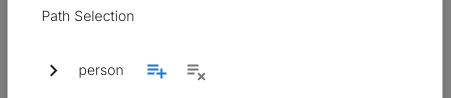
Select the plus icon on the root node to track row insertions.
Example – Person Deleted
Goal: Trigger a notification when a Person row is deleted.
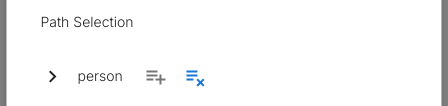
Select the delete icon on the root node to track row deletions.
Example – First Name or Last Name Changed
Goal: Trigger when first_name or last_name is updated.
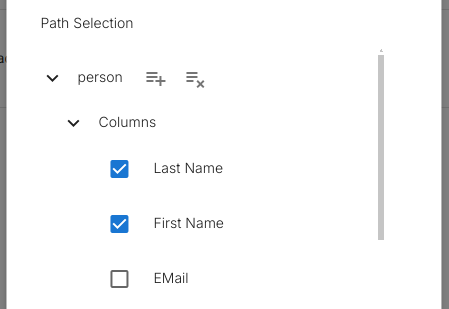
Expand:
PersonColumns- Select
first_nameandlast_name
Notifications are emitted only when these fields change.
Example – Phone Number Linked
Goal: Trigger when a phone number is added to a person.
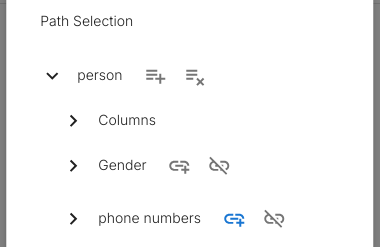
Expand:
PersonPhone Numbersrelation- Select the relation add icon
Example – Phone Number Unlinked
Goal: Trigger when a phone number is removed from a person.
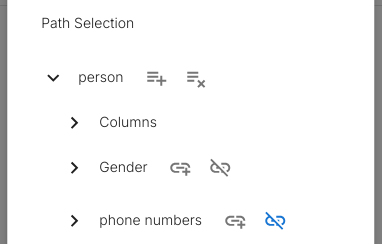
Expand:
PersonPhone Numbersrelation- Select the relation remove icon
Example – Phone Number Changed
Goal: Trigger when a phone number value is updated.
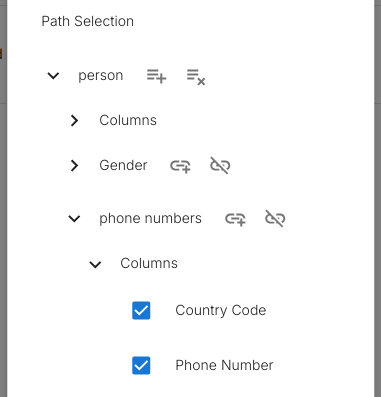
Expand:
PersonPhone NumbersrelationColumns- Select the
numberfield
Delivery Coupling
Mutation events do not send notifications by themselves.
They must be connected to a Webhook.