Notifications – Classification Events
Classification events emit notifications when a boolean classification changes state on a row.
They are evaluated on:
- A single source table
- A single value classification
- A defined from → to outcome transition
State semantics:
nullrepresents the absence of the classification and occurs on:- Row insertion
- Row deletion
- Classification removal
anymatches all possible states, includingnull
All transitions are supported.
Classification events are used to detect state changes, not continuous conditions.
Configuration
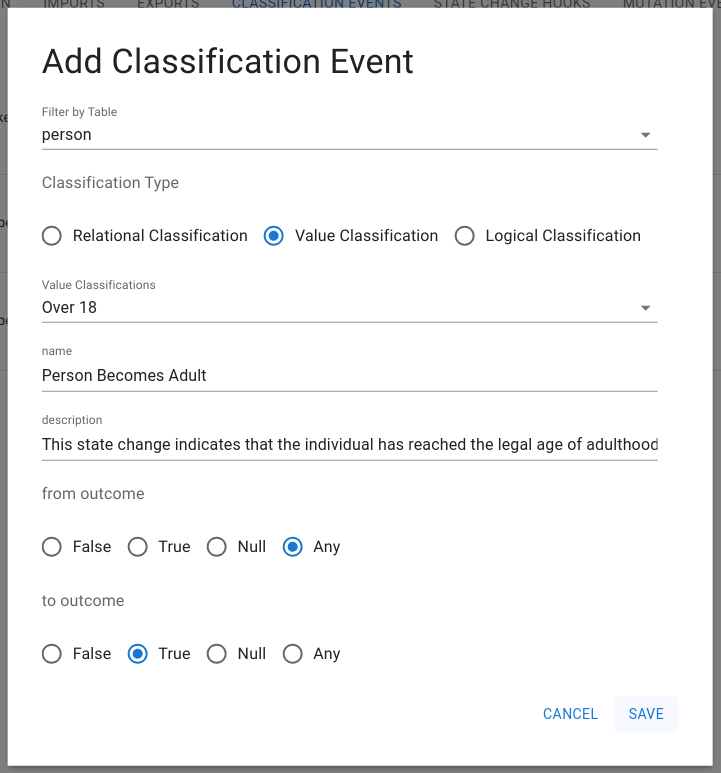
Classification events are configured from the Notifications interface.
Entry Point
Navigate to:
Data Exchange → Notifications → Classification Events
Creating a Classification Event
Each classification event is defined by four elements:
- Source table
- Classification
- From-outcome
- To-outcome
Required Configuration Fields
Source Table
Select the table where the classification is defined.
This determines:
- Which rows are monitored
- Which row IDs are emitted in notifications
Classification
Select one value classification from the selected source table.
Only boolean classifications are supported.
State Transition
Define the trigger condition using:
- From Outcome
- To Outcome
Supported values:
nulltruefalseany
The event triggers only when the classification changes from the selected from-state to the selected to-state.
Example Configuration — Person Becomes Adult
Source Table: person
Classification: is_over_18
From Outcome: false
To Outcome: true
This emits a notification exactly when a person transitions from minor to adult.
Save & Activation
- Events are inactive until saved
- Once saved, the event becomes immediately active
- No system restart or redeployment is required
Delivery Coupling
A classification event does not send notifications by itself.
It must be connected to:
- A Webhook
- An Authentication configuration
Delivery behavior is defined entirely by the linked webhook.