Columns
A column defines an attribute of the rows in a table. Columns control what data is stored, how it is validated, and how Minyu renders the field in forms and lists.
Creating a column
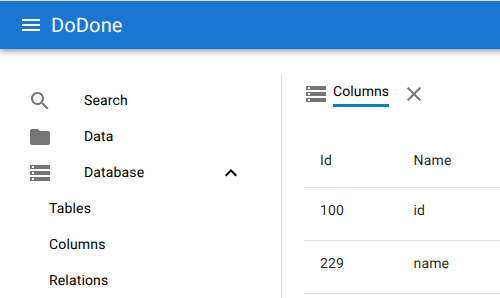
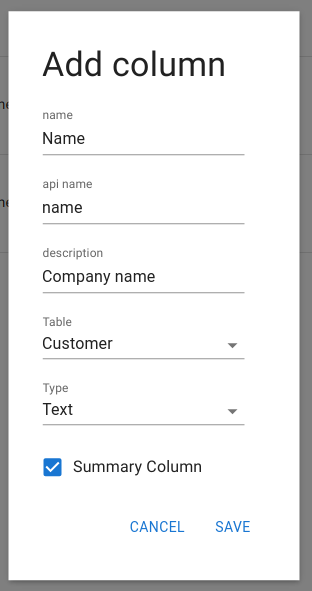
Columns are added from Database → Columns after selecting a table. Use the add button to define a new column. Minyu requires the following fields:
- Name: Human-readable label shown in the UI.
- API name: Identifier used in API calls. Must be lowercase, may include numbers and underscores, and cannot start with a number.
- Description: Optional help text presented in forms.
- Table: The table the column belongs to.
- Type: Determines the storage format and the input component used in smart forms.
Here is the rewritten documentation section, now aligned exactly with your actual DataType enum and cleaned up for technical consistency:
Available data types
Minyu supports the following column data types. Each type controls storage format, validation, and (when applicable) how the field is rendered in smart forms.
- Short Text: Single-line text input.
- Whole Number: Integer values.
- Decimal Number: Decimal values.
- Date: Calendar date without time.
- Yes / No: Boolean true/false value.
- Date & Time: Date with time.
- Time: Time of day without date.
- Date Range: Start and end date.
- Date & Time Range: Start and end date with time.
- Long Text: Multi-line text for descriptions or comments.
- Color: Color selection field.
- Schedule: Binds the row to a repeating time pattern. Used to select predefined shift or availability patterns such as day shift, night shift, or other recurring schedules.
Each type controls both validation and how the field appears in forms.
Summary columns
Columns can be designated as summary columns. These provide the human-readable label shown for rows in lists, searches, and relationships. For example, combining “First Name” + “Last Name” allows a Person row to be displayed as “Anna Andersson”.